
Instagram Trending Ai photo editing prompts
Hello friends, how are you all? I hope you are doing very well. You might already know that most of the photos currently going viral or trending on Instagram are edited using AI. People no longer edit their photos using traditional manual apps like they used to, because everyone has realized how easy it has become to edit or create photos using AI. If you use social media apps like Instagram, Facebook, or Snapchat, you have surely noticed how significant AI photo editing has become to people these days. If you have ever done photo editing, you know how much time it used to take with various apps, and often the results weren’t quite what you wanted—the editing didn’t always turn out exactly to your liking. But now, with the advent of AI, that same photo editing can be done in a fraction of the time. Friends, new AI photo editing styles are constantly trending on Instagram every day. It isn’t feasible to write a separate article for every single one of those editing tutorials. That is why I decided to create an article where I can provide you with the prompts for the AI photo editing styles that are currently going viral or trending on Instagram. With that in mind, I have published this article for you. I have pinned this article to my website, which you may have already noticed. In this article, I will regularly provide prompts for photo editing styles that share a similar process—meaning they can be edited using the same method. I will also explain how you can easily edit your own photos using AI and these prompts.
Now, I will explain how you can edit your photos using Instagram trending AI photo editing prompts.
To edit photos using AI, you need to use a high-quality AI app or website. While there are many AI apps and websites available, not all of them deliver good photo editing or high-quality image generation. Currently, ChatGPT is the most popular AI tool for photo editing and image creation. Images edited or generated using this AI look incredibly realistic and turn out exactly the way you want them. I personally use ChatGPT to edit my own photos, as it consistently delivers excellent, realistic results. I highly recommend that you also use ChatGPT for editing your photos or creating new ones.
To edit photos using ChatGPT, first open the ChatGPT app or website on your phone or device. Mobile users can find ChatGPT on the Play Store or App Store, while desktop users can access the website via any browser. If you are visiting for the first time, you will need to sign in. Once signed in, look for the plus (+) icon to upload a photo; click on it and select the ‘Photos’ option. This will open your gallery, allowing you to choose the specific photo you want ChatGPT to edit. After selecting the photo, click the ‘Done’ option to upload it to ChatGPT. Next, enter your prompt and click the ‘Send’ or ‘Generate’ button; within moments, ChatGPT will produce the edited version of your photo. By following these simple steps, you can have your photos edited in a highly attractive way using AI.
The prompts I have provided below are currently very popular for photo editing on Instagram. Moving forward, I will continue to share prompts in this article for AI photo editing styles that go viral on the platform. And rest assured, this does not mean I will stop posting other articles; I will certainly keep publishing content regularly. However, I will specifically use this article to provide prompts for photo editing styles that share a similar technique or approach.
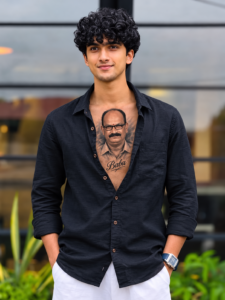
Use the uploaded photo as the identity reference.
 Preserve the person's original face, hairstyle,
skin tone, body proportions, pose, expression,
and the exact same shirt without any changes.
 Leave only the top buttons slightly open.
 Add a realistic black-and-grey portrait-style
 chest tattoo inspired by [REFERENCE PHOTO],
 seamlessly blended with the skin using authentic
 tattoo shading and fine details. If provided,
 include the name "[NAME]" in elegant cursive
 beneath the portrait. Keep the original
 composition, natural lighting, and create an
 ultra-realistic, cinematic, high-quality result.
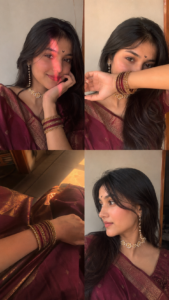
Ultra-realistic 9:16 iPhone 15 front-camera
 selfie collage (2×2 equal squares), authentic
 handheld quality with subtle grain, motion
 blur, natural skin texture, no beauty filter.
 Young woman in maroon silk saree with gold
 border, black crescent bindi, wavy middle-part
 hair, pearl-gold floral choker, ear-chain
 earrings, maroon-gold bangles. Top-left: chin
 on hand, pink-red diagonal light stripe.
 Top-right: forearm covering mouth, bangles
visible, dreamy eyes. Bottom-left: close-up
 of bangles on saree lap with golden-orange
 light. Bottom-right: side-profile highlighting
jewelry. Warm indoor flash, cream wall, casual
 selfie perspective, realistic smartphone
 colors and lighting.
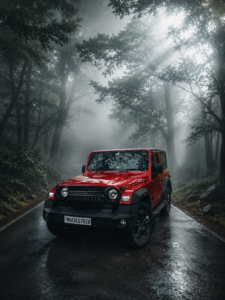
Transform this image into an ultra-realistic
 cinematic foggy forest masterpiece. Add
 dense natural white mist throughout the
environment, creating a mysterious
 atmosphere. Apply rich forest color
grading with deep emerald green, dark teal,
moss green, and earthy brown tones. Enhance
 trees, foliage, and background details for
 a lush enchanted woodland look. Add soft
volumetric light rays penetrating the fog,
 atmospheric depth, realistic textures, HDR,
 sharp 4K details, balanced contrast,
natural highlights and shadows, dreamy
fog layers, and professional DSLR-style
cinematic grading. Maintain a premium,
realistic cold misty morning forest
 photography aesthetic.
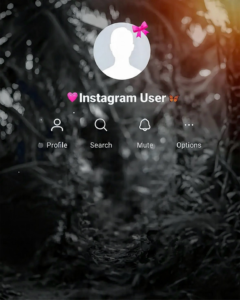
Use the provided template image as the
 exact layout reference. Preserve the entire
Instagram interface overlay, including the
 profile icon, “Instagram User” text, all
 icons, and “ALVIDA 😤” text in their exact
positions. Replace only the original central
 person with the person from the new photo,
 preserving their identity, face, clothing,
 and proportions. Match the original framing
 exactly. Apply a balanced cinematic black-and-white
 look with medium-dark contrast, keeping the
 subject clearly visible. Add a dark cinematic
 forest background with subtle mist and depth,
 clearly separating the subject from the
 background. Maintain an ultra-realistic,
high-quality cinematic appearance.
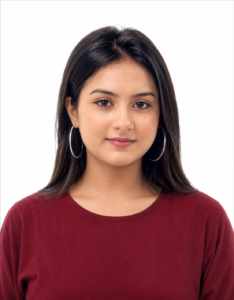
Create a photorealistic passport-size portrait
 using the uploaded photo as the only
 identity reference. Preserve the
 subject’s identity, facial features,
 skin tone, hairstyle, hair texture, and
realistic appearance exactly. Keep
 the original neck and throat structure,
 length, shape, and proportions unchanged.
 Only straighten the head and face so the
 subject looks directly at the camera with
 a neutral expression and both eyes open.
 Do not stretch, lengthen, slim, or reshape
the neck. Keep the subject centered with
shoulders visible, white background, soft
even lighting, natural skin tones, sharp
 details, and official passport-style
 composition. 35mm × 45mm.
Why are AI photo editing prompts trending on Instagram?
These AI photo editing prompts have become immensely popular because various AI-generated images frequently go viral on Instagram. People love these AI-created photos, leading to high engagement—likes, comments, and shares—which helps them reach millions of users. Seeing these images inspires others to try editing their own photos in the same style, further fueling their popularity. Moreover, since AI allows for high-quality editing in very little time, people are increasingly using these prompts. AI performs photo editing with remarkable precision. In the past, achieving a great photo required traveling to specific locations for a photoshoot and then spending significant effort on editing; now, however, you don’t need to go anywhere special or struggle with complex editing processes. You can easily transform a simple photo taken on your phone into a stunning, professionally edited image right from the comfort of your home—using just a single prompt and a single click. With AI, you can instantly apply different backgrounds, outfits, color tones, and more to an ordinary photo. These factors have made AI-edited photos go viral and gain widespread popularity. AI photo editing has become incredibly significant, and its role in the field of photo editing is set to grow even further in the future.
Tips for AI Photo Editing –
Use a clear photo –
When using AI for photo editing, always choose a clear photo where your face is clearly visible. Since the AI analyzes your face in detail, using a clear image prevents the common issues that often arise during AI editing.
Photoshoot tips –
You can take photos using either the front or back camera, but ensure the framing is straight and not awkwardly tilted. Feel free to ask friends for help with the photoshoot. Also, avoid taking photos in very dark areas; instead, choose a well-lit location. This ensures you get excellent results when editing with AI.
AI Prompts –
A crucial element for AI photo editing is the prompt. The more detailed and well-structured your prompt is, the better the AI will understand your requirements and attempt to edit the photo exactly according to your instructions.
Overall—
Friends, various editing styles are constantly going viral on social media these days, especially on Instagram. Among them, the most viral trend is AI photo editing. Editing photos with AI is incredibly easy and doesn’t take nearly as much time as it used to. You can now use various AI prompts to edit your photos in a highly attractive way. Throughout this article, I will share prompts for the AI photo editing styles that are currently trending on Instagram, allowing you to create eye-catching edits. If you want to try out trending photo editing styles, these Instagram AI prompts will be extremely helpful for you. So, friends, that’s all for today’s article—see you in the next one.
