
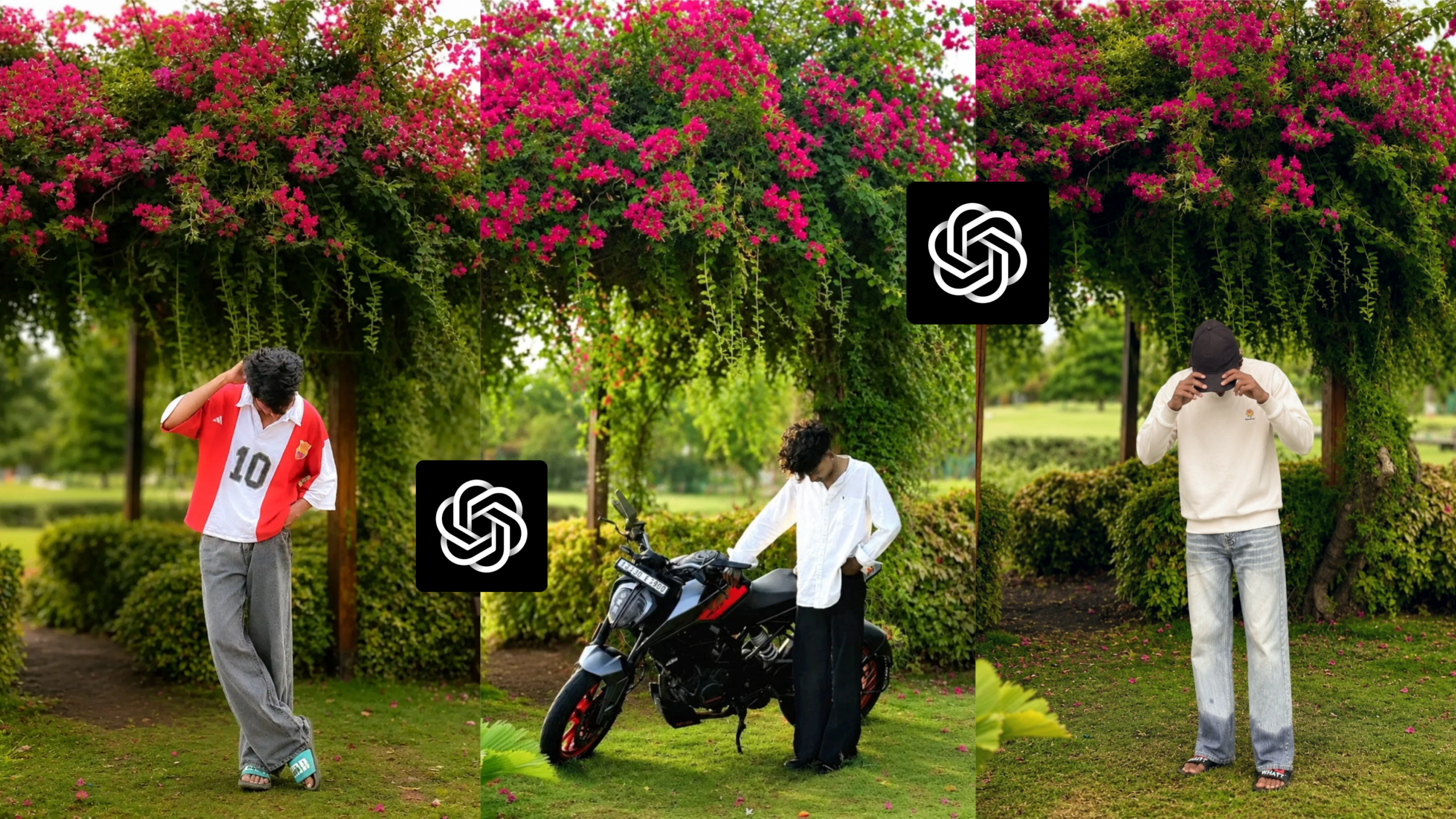
Bougainvillea Background Ai photo editing
Friends, various photo editing trends have recently emerged on social media. Platforms like Instagram, Facebook, WhatsApp, Snapchat, and YouTube are currently seeing a surge in popularity for specific editing styles. One trend that stands out prominently is “Bougainvillea Background AI photo editing.” People are now creating these images easily and quickly using AI, requiring only a simple prompt and a base photo. AI-driven photo editing is currently one of the biggest trends in the digital space. If you have an ordinary photo with a lackluster background, you can now use AI—along with a specific background and prompt—to transform it into something truly eye-catching. These edits incorporate various elements like vibrant colors, lighting adjustments, cinematic tones, and blur effects to create stunning visuals. Many people are creating these AI-generated images and posting them on social media, garnering a significant number of likes, comments, and shares. With the right prompt, the right background, and your own photo, you too can create these images with just a single click. In this article, I will explain in detail how you can create this amazing edit yourself. So, be sure to read this article carefully from start to finish. Let’s get started!
What is Bougainvillea Background Ai photo editing ?
Friends, “Bougainvillea Background AI photo editing” is currently one of the most popular trends in AI-based photo editing. In this style of editing, the original subject (the model) remains unchanged, while the background is replaced. Typically, the scene features a beautiful Bougainvillea plant—laden with red flowers and green leaves—positioned above a wooden door frame behind the model. Small bushes are visible at the base of the door frame. A narrow dirt path extends from within the doorway to the spot where the model is standing or sitting, with scattered Bougainvillea petals lying on the path. Patches of grass line both sides of the narrow path, and a wooden bench sits beside the door frame. The background features lush green trees with a blur effect applied to them. Finally, the entire image is enhanced with a cinematic color tone—specifically, a warm color palette. You can create this entire look using an AI tool by combining a background image, your own photo, and a specific AI prompt. This method ensures there are no issues with altering the subject’s face or pose. The reasons for the current popularity of this type of photo editing are explained below.
Why is Bougainvillea background AI photo editing so popular right now?
There are several reasons why this Bougainvillea background AI photo editing has become so popular among people:
1. Its Cinematic Look
This photo editing style employs a unique cinematic tone or effect that seems to give the photo the power to tell a story. The various tones involved create a distinctive look. It features a warm cinematic vibe that lends an aesthetic appeal to the image. Photos using this cinematic tone are currently going viral, especially on Instagram.
2. Bougainvillea Flowers
Bougainvillea flowers look stunning when used as a photo background. Since these flowers aren’t found everywhere, it can be difficult for someone to plan a photoshoot featuring them. However, once you learn this editing technique, you won’t need to travel anywhere; you can do it right from the comfort of your home. Many people love taking photos under these flowering plants and sharing them on social media, where they receive a great response. Thus, these flowers play a significant role in the popularity of this editing style.
3. The Trending Background
Many people are using this specific background to edit their photos by replacing their original backgrounds. When these edited photos are shared on social media, they are widely appreciated and often go viral. I have provided this background further down in the article so you can use it to replace the background of an ordinary photo and create this trending style yourself.
4. The Role of AI
As you likely know, photo editing has become incredibly easy with the advent of AI. If you have ever edited photos manually using apps like PicsArt, Lightroom, or Snapseed, you likely know how time-consuming the process was—and how often the results fell short of your vision. However, you are probably already aware of how much easier photo editing has become with the advent of AI. Now, by simply using a detailed prompt and one of your own photos, you can edit your images in seconds with the help of AI.
What do you need to create this type of Bougainvillea background AI-edited photo?
To edit photos in this style, here is what you will generally need:
1. A photo of yourself
You will need a photo of yourself—ideally a full-body shot. You may have noticed that the featured images in this article use full-sized photos. I suggest using a full-body photo for this edit to ensure the best results. Also, try shooting the photo with your phone’s rear camera for superior quality. Higher image quality allows the AI to analyze your photo better and execute the edit with greater precision. This helps avoid common issues like facial distortion.
2. An AI prompt and a background image
The most crucial element for this type of AI photo editing is the prompt. You can write your own prompt, or simply use the one I’ve provided below. I have also included the background image below; by combining these elements with AI, you can easily create your own Bougainvillea background AI-edited photo.
THE BACKGROUND 🌸🌿
CLICK HERE 👇 FOR BACKGROUND
THE PROMPT 👇
Replace only the background while keeping
 the person's face, hairstyle, outfit,
 pose, body proportions, lighting,
 expression, skin tone, and identity
exactly unchanged. Place the subject
beneath a beautiful wooden pergola
covered with vibrant pink bougainvillea
 flowers and cascading green vines in
a peaceful garden park. Add lush green
 grass, trimmed bushes, a wooden bench,
 a soft dirt pathway, and distant
trees with creamy bokeh. Use warm
 golden-hour lighting, realistic
shadows, shallow depth of field,
DSLR 85mm lens, HDR quality,
 ultra-realistic textures, vibrant
natural colors, and premium cinematic
color grading. Suitable for both boys
 and girls.
3. An AI application or website
You will need an AI app to perform this kind of photo editing. Personally, the two AI tools I use most frequently for photo editing are:
1. ChatGPT AI
2. Google Gemini AI
I consistently achieve excellent results whenever I edit my photos using these two AI tools. If you use them for your own edits, I expect you will get great results as well. Mobile users can find apps for both of these AI tools on the Play Store. Desktop users can easily find the websites for both of these AI tools. Using them is very simple; even a complete beginner can use them with ease.
How to create a Bougainvillea background AI photo edit?
To create this photo edit, first, open any AI application or website on your device. Once opened, select the photo you wish to edit. Next, download and select the Bougainvillea background image I provided earlier. Then, copy the prompt I shared above and paste it into the designated area. Click the ‘Send’ or ‘Generate’ button, and within moments, the AI will process and create your edited photo. Once the edit is complete, save the image to your gallery. By following these simple steps, you can easily create this style of photo edit yourself.
Overall –
“Bougainvillea background AI photo editing” is currently one of the trending photo editing styles on social media. It creates an aesthetic image by incorporating beautiful cinematic effects, a warm vibe, and specific lighting. Using just a background image, the right prompt, and a standard photo of your own, you can create this edit with a single click. These photos are going viral, especially on Instagram, where this style is immensely popular. If you create and upload these AI-edited photos to Instagram, there is a high chance they will go viral. That’s all for today’s article. See you in the next one—stay well and healthy.
