
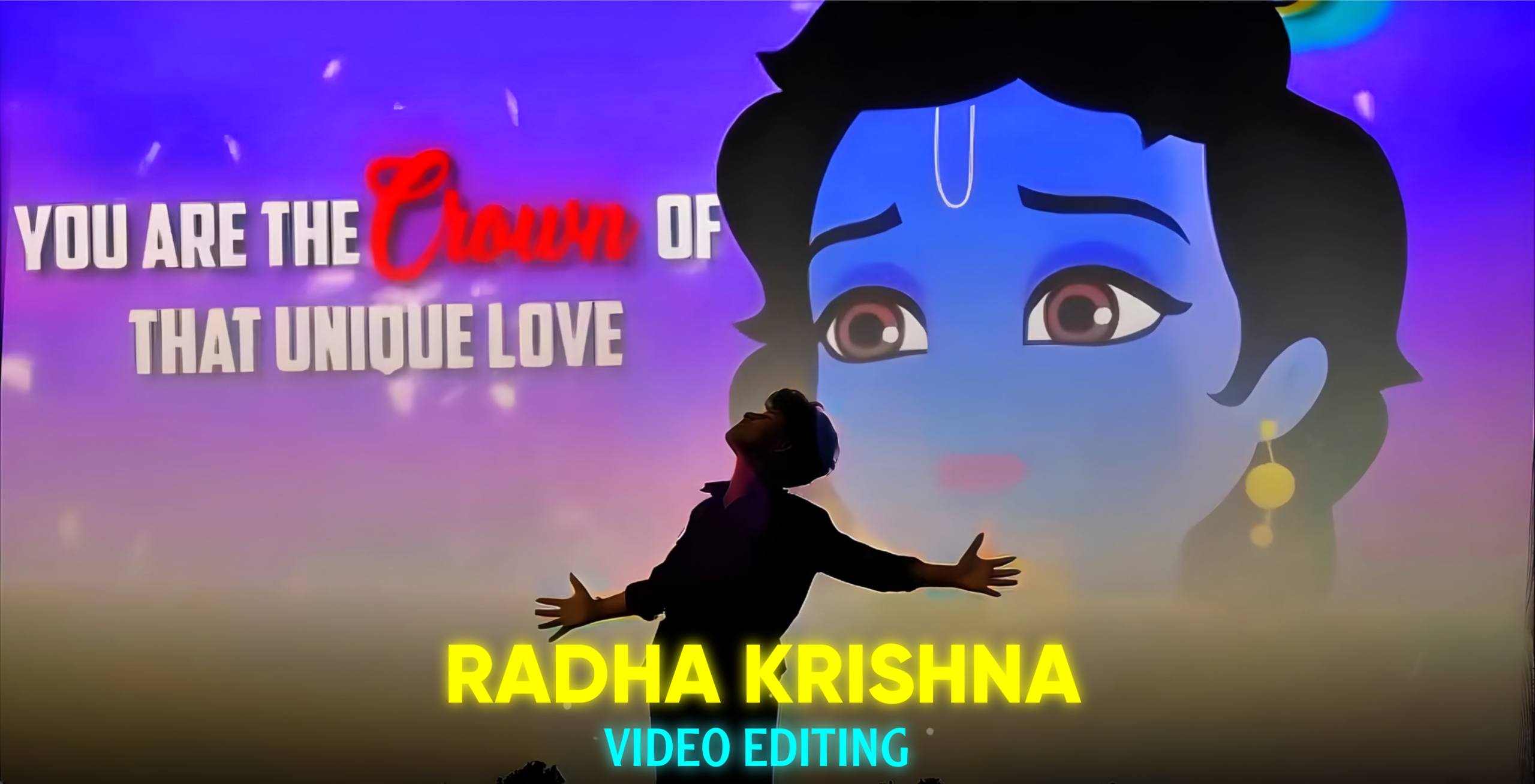
Trending Radha Krishna Video Editing
Nowadays, various types of short videos—such as Reels and edited clips—are going viral across different social media platforms. Among them, the “Trending Radha Krishna” video edit has become incredibly popular. These videos are particularly viral on Instagram Reels. I have noticed that even users with ordinary photos who edit them using video editing apps and upload the results to Instagram Reels are seeing their videos go viral. Even accounts with virtually no followers are garnering millions of views by creating and uploading these Radha Krishna videos—which feature beautiful devotional themes, cinematic editing, and emotional status vibes. Even if you don’t have a large following, uploading this type of edited video to Instagram gives you a very high chance of going viral. These videos are capturing people’s attention because they are visually stunning and emotionally moving. So, in today’s article, I will show you exactly how to easily create these videos using just a simple photo of your own. If you want to learn this editing technique, be sure to read this article carefully from start to finish; you will find it very easy to master. Let’s get started with today’s article.
What is this trending Radha-Krishna video editing?
Friends, this Radha-Krishna video editing style is currently one of the most viral trends on social media. These videos are beautifully crafted using various cinematic effects, color grading, and lighting effects. The key element that captures people’s attention is the Radha-Krishna video clip featured within them. These videos are visually stunning; they possess a cinematic storytelling quality and serve as emotional status videos. As you know, the story of Radha and Krishna’s love and devotion is deeply embedded in people’s hearts. By showcasing a brief tale of their love, these videos deeply resonate with the audience. The process involves editing a photo so that a Radha-Krishna video clip plays in the background. While the background can be applied to photos taken in various locations, the editing works best if the original photo features a plain white sky. The resulting video carries an emotional tone. Various color grading techniques and lighting effects are applied to the Radha-Krishna clip itself; the clip used is typically a beautiful animation style that appeals to people of all ages. You, too, can easily create these videos—simply read this article carefully from start to finish.
Here is what you will need to create these videos:
To create or edit these videos, you will need a photo of yourself, a video clip of Radha-Krishna, and a video editing app.
First, take a photo of yourself. Make sure to shoot it in a 16:9 aspect ratio. Also, ensure that the sky occupies most of the background; this will make it much easier to integrate the Radha-Krishna video clip into the background later. If you already have such a photo, that’s great; if not, there is no need to worry—you won’t need to do a separate photoshoot. I have provided a prompt below that will allow you to easily edit any ordinary photo of yours to feature a sky background, enabling you to complete this project. Additionally, below the prompt, I have included a download link for the Radha-Krishna video clip so you can easily download it.

Use the uploaded photo as the exact identity
 and subject reference. Create a photorealistic
 16:9 landscape composition with the subject
 naturally placed in the lower-right area,
preserving the face, identity, hairstyle, clothing,
 pose, body proportions, and expression exactly.
 Replace the background with a vast natural white
 and pale blue cloudy sky occupying most of the
 frame, with soft diffused daylight. Add lush
green vegetation, dense trees, distant greenery,
and a peaceful natural landscape along the lower
 portion. Maintain realistic perspective, lighting,
shadows, depth, and seamless blending. Do not alter
the subject.
Why has this Radha-Krishna video editing style become so popular among people?
There are several reasons behind the popularity of this type of video editing:
Its Cinematic Look –
These videos are given a beautiful cinematic look through the use of various color grading techniques, lighting effects, and other visual enhancements. This allows the video to effectively tell a story to the audience.
The Love Story of Radha and Krishna –
The core element that drives the popularity of these videos is the inclusion of Radha-Krishna video clips. The love and devotion associated with Radha and Krishna are deeply ingrained in people’s hearts. Consequently, audiences love these videos because they often feature a short, touching narrative of Radha and Krishna’s romance.
Viral on Social Media –
These videos are going viral on platforms like Instagram Reels and other short-video sites, inspiring others to create similar content. I have observed that creators—ranging from beginners to established names—who edit and upload these videos see them go viral, garnering a huge number of likes, comments, and shares.
Easy to Edit –
Creating these videos does not require a lot of effort; you can easily make them using just a simple photo and a Radha-Krishna video clip. Below, I will explain exactly how you can create this trending Radha-Krishna video edit.
So, friends, how do you create this trending Radha-Krishna video edit?
First, use the prompt I provided earlier to edit your photo against a sky background with the help of an AI tool. Also, download the Radha-Krishna video clip using the link I shared. Next, open any video editing app on your phone. Since I use CapCut, I will explain the process using that app, though the steps are similar for other video editing apps.
Start by opening the CapCut app on your phone and importing the photo you shot or created. Then, tap on the ‘Overlay’ option and add the same photo again. Remove the background from this second photo. Now, add the Radha-Krishna video using the ‘Overlay’ option and adjust it carefully over your photo. Next, select the ‘Masking’ option, choose a mask, and align the video properly with the sky background of your photo. Slightly reduce the video’s opacity—setting it to around 90% works well. Finally, fit your photos to match the entire video, and your video is ready. Save it to your gallery in Full HD quality. By following these simple steps, you can create the video.
Overall –
Friends, this Trending Radha Krishna Video Editing style is currently very popular. The key element here is the Radha-Krishna video clip, which is really catching people’s attention and making this type of editing go viral. You can easily create these videos using just one of your own photos. In this article, I have clearly explained the process of creating this video. I hope you have understood the steps; if you are having any trouble, feel free to read the article again to fully master the technique. That’s all for today’s article—see you in the next one!
