
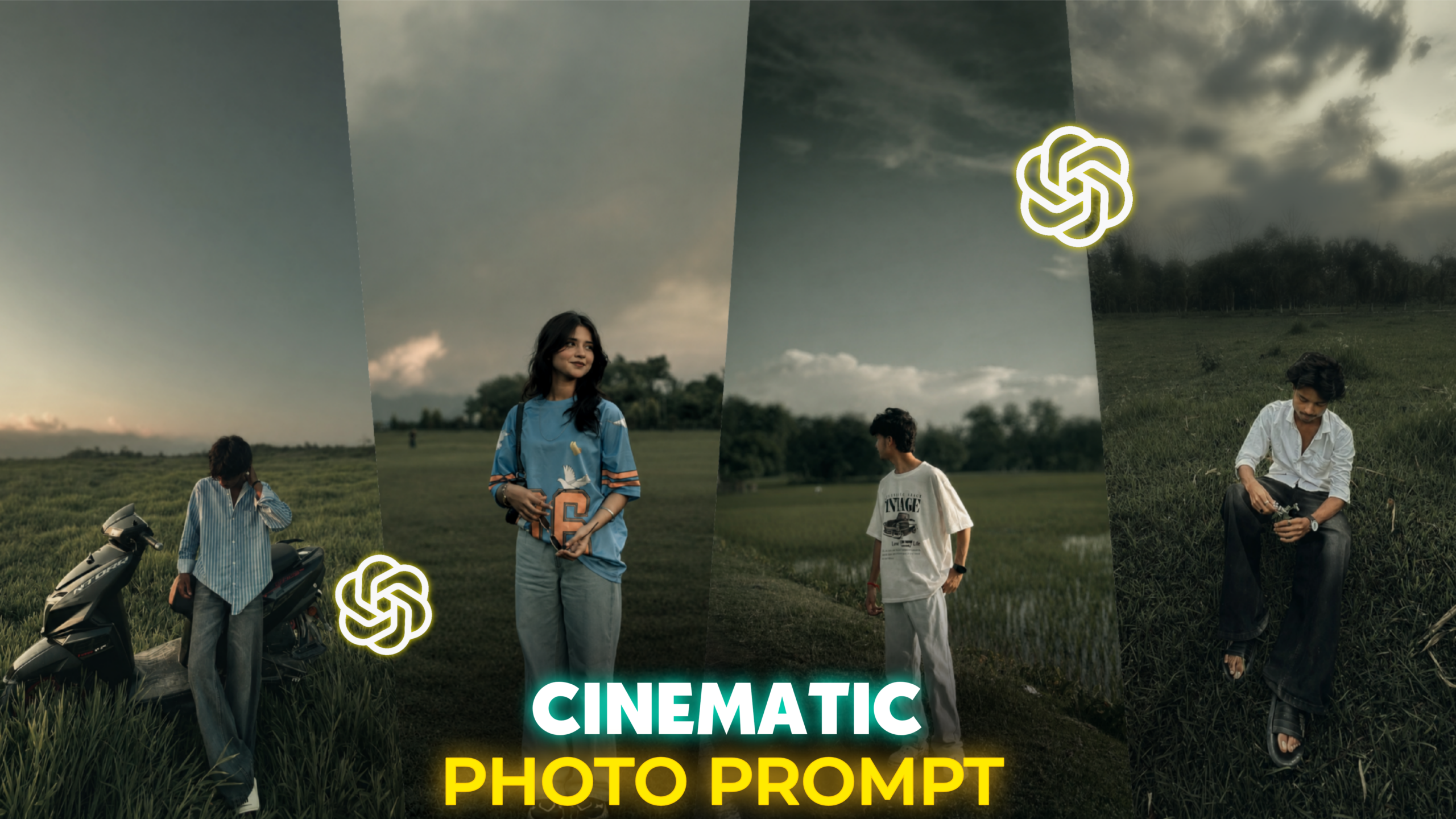
Cinematic AI Photo Editing –
Friends, today’s article is going to be a bit unique and truly amazing, because today I will teach you how to transform your ordinary photos into cinematic AI-edited masterpieces with just a single click. Creating such cinematic photo edits using AI has now become incredibly simple. In today’s world, photo editing has emerged as a crucial aspect of people’s daily lives. This is because photo editing is a process that allows you to take a standard photograph and elevate it into something truly beautiful. Particularly on social media, everyone now aspires to make their personal photos appear more professional, creative, and captivating. AI plays an extraordinary role in meeting this current demand for photo editing. Previously, people would spend two or three hours attempting to edit photos—often without achieving the exact results they desired—but now, AI accomplishes this effortlessly in just a single click, within a mere minute or two, producing results that look absolutely stunning. And the specific cinematic photo editing technique I am discussing today can also be executed with great ease—and with just one click—using AI. In today’s article, I will walk you through the entire process in detail. So, do not miss out on today’s article; please read it attentively from beginning to end. So, friends, let’s dive into today’s article right now.
What is Cinematic AI Photo Editing? –
Friends, nowadays almost everyone wants the photos they upload to their social media platforms to look highly professional and aesthetically pleasing. Among the various styles of aesthetic photo editing, “Cinematic AI Photo Editing” stands out as a prime example. Currently, on social media—particularly on Instagram—this style of cinematic AI editing is going viral, garnering a massive number of likes. Furthermore, those who apply this cinematic editing style to their photos before uploading them to Instagram are seeing a significant boost in their profile’s reach, as their edited photos frequently go viral. Essentially, Cinematic Photo Editing is a technique that, when applied to an ordinary photograph, instantly transforms it to look incredibly professional and polished. I told you that your photos would acquire a truly unique aesthetic look. In this style of photo editing, elements such as lighting, color grading, and tonality are meticulously adjusted. Previously, this type of editing was typically performed using the Lightroom app—widely considered the best tool for color grading available to mobile users. However, achieving these cinematic effects in Lightroom could be quite time-consuming; now, thanks to AI, you can accomplish this with just a single click. Below, I have provided a prompt that will allow you to transform your photos into this cinematic AI-edited style with just one click.
THE PROMPT 👇
Apply only a cinematic dark green color grade to the photo. Keep the original face, skin texture, outfit, pose, background, composition, and all objects completely unchanged. Transform the image with deep forest green, muted olive, dusty sage, and grey-green tones. Reduce saturation and vibrance while preserving natural skin tones. Create soft matte blacks, faded shadows, low contrast, and smooth highlight roll-off. Darken the overall mood with a premium cinematic film look inspired by misty mountain landscapes. Add some light background blur,Add subtle depth, soft atmospheric tones, and realistic color separation. Keep the red clothing slightly prominent against the desaturated green environment. Professional movie-style color grading, dark academia aesthetic, moody outdoor photography, faded green cinematic look, soft texture, realistic details, high-end Instagram edit, natural and authentic appearance, ultra realistic, 4K quality.
What is a Prompt?
Friends, a “prompt” is a piece of text that describes exactly what you want to create using AI. Currently, these prompts are most widely used for editing photos with AI. Through them, you can specify exactly what elements you wish to add to a photo—such as specific colors, lighting, or tones. Furthermore, if you wish to completely transform your attire or outfit, you can craft a custom prompt to instruct the AI to edit your photo according to your preferences. The more beautifully and clearly you write the prompt for the AI, the better the results you will achieve. I have already provided today’s “cinematic photo prompt” above; you can use it to create your own cinematic-style photo edits. Additionally, I regularly publish new articles featuring AI photo prompts on my website, “MB Editz.” If you visit my website regularly, you are sure to find a wealth of beautiful prompts to help you edit your own photos. Moreover, I frequently share prompts on my Telegram channel as well; feel free to join if you are interested. You will find the link to my Telegram channel at the very end of this article. So, friends, let me now explain how you can use today’s specific prompt to edit your own photos.
How to Create Cinematic AI Photo Edits:
Friends, to create this type of cinematic AI photo edit, the first step is to open the ChatGPT AI tool on your mobile phone. If you have never used ChatGPT before, let me tell you where to find it. You have the option to either install the ChatGPT mobile application or use the ChatGPT website; both will serve the same purpose equally well. However, if you are a mobile user, I highly recommend that you use the dedicated application. If you are an Android user, you can find the ChatGPT AI app on the Play Store; if you are an iOS (iPhone) user, you can find it on the App Store. Simply download and install the ChatGPT application from there. Once installed, sign in using any valid email address. After signing in, you will see a plus (+) icon at the bottom of the screen; tap on it once. Next, select the specific photo you wish to transform into a cinematic AI-edited image. Once selected, you will see a chat box appear alongside your photo; paste the prompt I provided earlier into this box, then click the “Send” option. Within a few moments, ChatGPT will generate and present your edited photo.
Overall —
Friends, cinematic AI photo editing is a modern photography style that lends an extraordinary aesthetic appeal to your ordinary photos. Previously, achieving this type of edit using tools like Lightroom was a very time-consuming process. However, thanks to AI, it is now incredibly simple to do. By copying the prompt I provided above, you can transform your own standard photos into this cinematic style with just a single click. This cinematic style of photo editing is currently going viral on Instagram, and users who upload such edited photos to their profiles are seeing a significant boost in their profile reach. With each passing day, performing these types of edits using AI becomes easier, and in the future, the popularity of AI-driven photo editing—both in this style and others—is only set to grow further. So, friends, simply follow the steps I outlined in this article to edit your photos, and you are sure to achieve excellent results. If you encounter any issues while attempting to edit your photos, feel free to send me a DM on Instagram; I will do my absolute best to assist you. And yes, when sending a DM, please state your problem directly to me; do not simply write “Hi” or “Hello.” This ensures that I can immediately understand that you are facing an issue.
That is all for today’s article. I look forward to seeing you in the next one. Stay safe and stay healthy.
